
The Newsfeed module can be configured to display news from selected channels only.
Previously, only one “My News” module could be added and only on the Homepage. You can now:
-
Add multiple My News modules and filter each one by specific channels
-
Use them on both the Homepage and Hubs
Typical use cases
You can use the Filtered Newsfeed module to:
-
Split the newsfeed into multiple sections
-
Promote a specific channel
-
Separate global and local news, or corporate and subsidiary news
-
Create dedicated newsfeeds inside a Hub
Example: A Marketing Hub that only shows news from the Marketing channel
Important
To use channel filtering:
-
Channels must be created first.
-
News items must be assigned to the corresponding channel when published.
Channels are managed by admins with the Navigation permission under Company Settings > Channels
How to add a Newsfeed module
-
Go to the Homepage or the Hub you want to edit.
- If you want to add it to the Homepage, admins can do it from Company Settings > Homepage (This requires you to have the
Company Settingspermission) - If you want to add it to a Hub, navigate there and click 'Customize' on the top right corner (This requires you to have the
Customize Hubspermission)
- If you want to add it to the Homepage, admins can do it from Company Settings > Homepage (This requires you to have the
-
Once in the Customization tool, click add module and select 'My News'
-
You can add multiple 'My News' module and it's supported only in the 2/3 column.
-
- Press 'Save'.
How to configure channel filtering
After adding the module:
-
Click the Settings icon (cog).
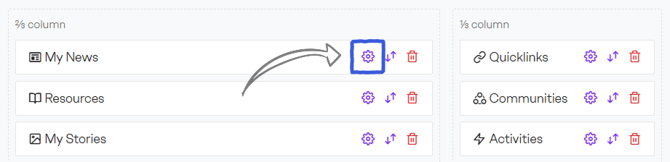
-
Choose the filtering logic.
Include logic
Only news from selected channels will be shown.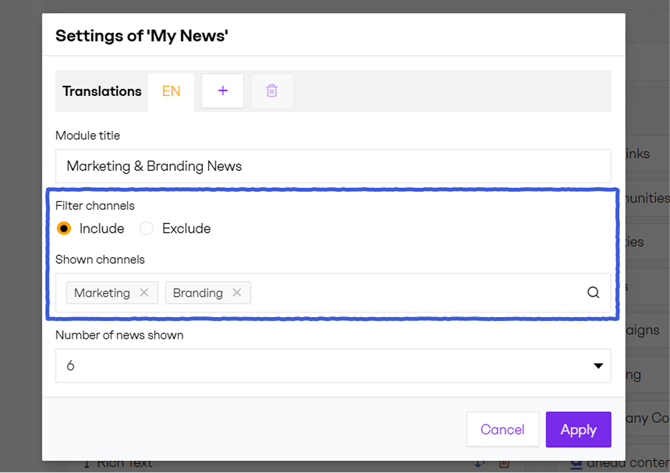
Example: Include Marketing and Branding.
The module displays news only from these two channels.
Exclude logic
All channels are shown except the selected ones. News without an assigned channel will also appear.
Example: Exclude HR.
The module displays news from all channels except HR. News without a channel is still displayed.
What users see
Channel filtering does not override targeting rules.
This means:
-
Users only see news that is targeted to them.
-
The module does not show all news from a selected channel, only news each user has permission to see, defined by the targeting settings.
-
Showing all news from a channel while ignoring targeting is not supported.
Additional behavior:
-
The channel selector only lists channels available under the applied include or exclude logic.
-
The All news link at the bottom of the module always redirects to the global All News page, regardless of the channel filtering configured in the module. Channel filters applied within the module are not carried over. Linking to a filtered All News view is not supported.